
Axle sends webhook notifications when data is uploaded and validated, and when Rose investigations complete. This document explains how to receive and validate these webhooks.
Setup
- Login to Axle
- Within settings, navigate to the Webhooks tab
- Submit the form to create your webhook by pressing "Create Webhook"
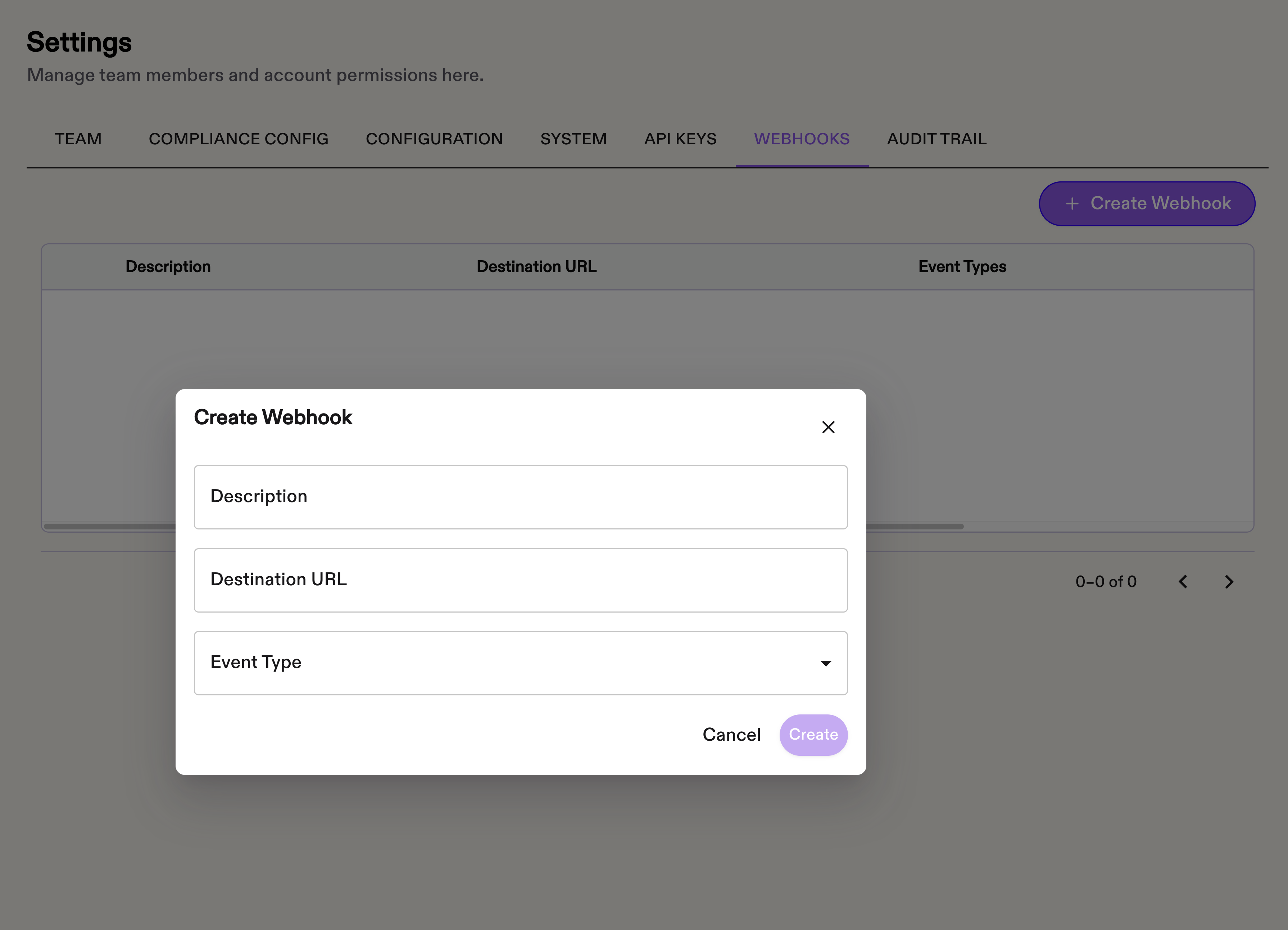
Webhook Details
Webhook Documentation
Overview
The system provides webhook notifications for critical events in transaction monitoring and investigation processing. Webhooks enable real-time updates to external systems when key events occur.
Webhook Events
Transaction Upload Events
TRANSACTION_UPLOAD_PROCESSING
TRANSACTION_UPLOAD_PROCESSINGTriggered when transaction file download from storage is successful.
Payload:
{
  "event_type": "transaction_upload.processing",
  "session_id": "b9e748f2-a600-4e6b-96b9-991a9399bb60",
  "organization_id": "da4ad981-739b-4524-8c99-f3d339ca1ae7",
  "message": "We downloaded your transaction file."
}
TRANSACTION_UPLOAD_VALIDATED
TRANSACTION_UPLOAD_VALIDATEDTriggered after successful validation of transaction data.
Payload:
{
  "event_type": "transaction_upload.validated",
  "session_id": "b9e748f2-a600-4e6b-96b9-991a9399bb60",
  "organization_id": "da4ad981-739b-4524-8c99-f3d339ca1ae7",
  "message": "All transactions were successfully validated"
}
TRANSACTION_UPLOAD_COMPLETED
TRANSACTION_UPLOAD_COMPLETEDTriggered when transactions are successfully inserted into the database.
Payload:
{
  "event_type": "transaction_upload.completed",
  "session_id": "b9e748f2-a600-4e6b-96b9-991a9399bb60",
  "organization_id": "da4ad981-739b-4524-8c99-f3d339ca1ae7",
  "message": "All of the transaction were successfully inserted."
}
TRANSACTION_UPLOAD_FAILED
TRANSACTION_UPLOAD_FAILEDTriggered when transaction processing fails at any stage.
Payload:
{
  "event_type": "transaction_upload.failed",
  "organization_id": "da4ad981-739b-4524-8c99-f3d339ca1ae7",
  "session_id": "b9e748f2-a600-4e6b-96b9-991a9399bb60",
  "error_count": 1,
  "errors": [
    "Failed to insert transactions"
  ],
  "description": "Transaction validation failed"
}
Investigation Events
ALERT_ANALYSIS_COMPLETED
ALERT_ANALYSIS_COMPLETEDTriggered when Rose alert investigation analysis completes.
Payload:
{
  "event_type": "alert.analysis_completed",
  "timestamp": "2024-01-15T11:00:00.000000",
  "organization_id": "da4ad981-739b-4524-8c99-f3d339ca1ae7",
  "investigation_id": "387b41df-7b57-434c-8be8-064d3bb91fcd",
  "alert_source_id": "alert-id-456",
  "disposition": "ESCALATED"
}
PDF Generation Events
PDF Generation events are only generated for ROSE PDFs. Baley PDF generation is a distinct endpoint that requires polling.
Rose PDF generation is processed asynchronously with webhook delivery. When a request is received, the system first checks if a PDF already exists for the investigation. If a PDF exists, the current status is returned immediately. If no PDF exists, a background generation task is initiated and the request is accepted (HTTP 202 Accepted). The PDF is generated and delivered via webhook when ready.
ROSE_PDF_GENERATED
Triggered when a Rose PDF has been generated successfully. Payload carries the PDF file URL plus metadata including the file title and status.
Payload:
{
  "event_type": "rose.pdf.generated",
  "investigation_id": "cf4a5a38-4d8b-4ff5-964a-77f0c0fd5534",
  "organization_id": "da4ad981-739b-4524-8c99-f3d339ca1ae7",
  "timestamp": "2024-01-15T11:00:00.000000",
  "message": "PDF generated successfully.",
  "file": {
    "url": "URL",
    "title": "18cdc731-992c-4a68-a26f-9aacc1229d51.pdf",
    "status": "COMPLETED"
  }
}
ROSE_PDF_GENERATION_FAILED
Triggered when PDF rendering fails after a PDF generation request was accepted. On occasion, we are unable to generate a PDF as requested. In these cases we will trigger a ROSE_PDF_GENERATION_FAILED event.
Payload:
{
  "event_type": "rose.pdf.generation_failed",
  "investigation_id": "cf4a5a38-4d8b-4ff5-964a-77f0c0fd5534",
  "organization_id": "da4ad981-739b-4524-8c99-f3d339ca1ae7",
  "timestamp": "2024-01-15T11:00:00.000000",
  "message": "There was an error while processing the pdf"
}
Webhook Configuration
Webhooks are configured per organization and event type. Each organization can have multiple webhook endpoints for the same event.
Webhook Security
Authentication:
- Each webhook request includes HMAC-SHA256 signature in
X-Signatureheader - Signature computed using organization's webhook secret
- Verify signature before processing webhook payload
Headers:
X-Signature: signature...
X-Delivery-ID: unique-delivery-id
User-Agent: Hikari-Webhook/1.0
Content-Type: application/json
Retry Logic
- Failed webhook deliveries are retried with exponential backoff and jitter
- Maximum 5 retry attempts
Response Requirements
- Webhook endpoint must return HTTP 2xx status code within 10 seconds
- Non-2xx responses or timeouts trigger retry logic
- Response body is ignored
Error Handling
Common Failure Scenarios
-
Validation Failures
- Invalid JSON format
- Missing required fields
- Entity reference mismatches
- Data type violations
-
Database Insertion Failures
- Duplicate transaction IDs
- Foreign key violations
- Connection timeouts
Security
- All webhooks are signed using HMAC-SHA256
- Verify signature before processing payload
- Only HTTPS endpoints with TLS 1.2 or higher are supported
- Keep your webhook secret secure
Need help? Contact Axle.
Implementation Examples
import hmac
import hashlib
import json
from flask import Flask, request, abort

app = Flask(__name__)
WEBHOOK_SECRET = "your-webhook-secret"

def verify_signature(payload: bytes, signature: str, secret: str) -> bool:
    expected = hmac.new(
        secret.encode(),
        payload,
        hashlib.sha256
    ).hexdigest()
    return hmac.compare_digest(
				expected,
        signature
    )

@app.route('/webhook', methods=['POST'])
def handle_webhook():
    signature = request.headers.get('X-Signature')
    if not signature:
        abort(401)

    if not verify_signature(request.data, signature, WEBHOOK_SECRET):
        abort(401)

    event = json.loads(request.data)
    event_type = event.get('event_type')

    if event_type == 'transaction_upload.completed':
        handle_upload_complete(event)
    elif event_type == 'alert.analysis_completed':
        handle_analysis_complete(event)
    elif event_type == 'transaction_upload.failed':
        handle_upload_failure(event)

    return '', 200

def handle_upload_complete(event):
    print(f"Transactions uploaded: {event['transactions_inserted']}")

def handle_analysis_complete(event):
    print(f"Investigation {event['investigation_id']} completed: {event['disposition']}")

def handle_upload_failure(event):
    print(f"Upload failed: {event['errors']}")